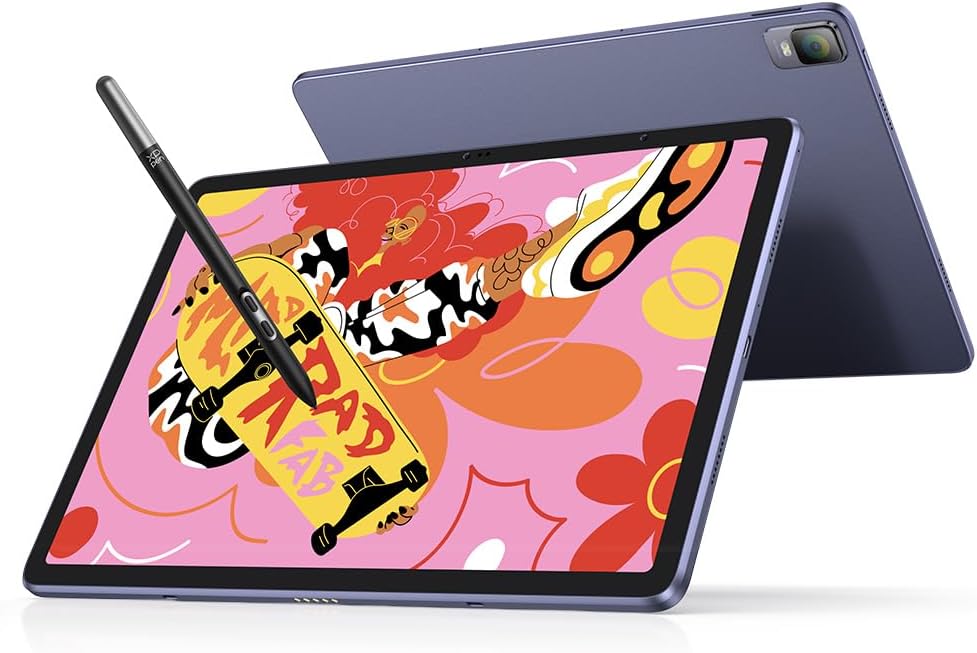

For years, digital artists were tethered to their desks, bound by thick cables and the processing power of a desktop computer. The dream of sketching in a park or finishing a professional commission at a coffee shop usually required a massive investment in a high-end iPad Pro or a bulky laptop-tablet hybrid. Enter the XPPen Magic Drawing Pad. This 12.2-inch standalone powerhouse is designed specifically for creators who crave freedom without sacrificing technical precision. Boasting the industry’s first 16,384 pressure levels and a stunning paper-like display, it promises to bridge the gap between traditional tactile feel and modern digital efficiency.
The Evolution of Standalone Drawing Tablets
In the current creative landscape, “portability” used to mean “compromise.” You either had great pressure sensitivity on a device that required a PC, or you had a portable tablet that felt like drawing on slippery glass. The XPPen Magic Drawing Pad changes that narrative. By integrating the Android 14 ecosystem directly into a high-spec drawing monitor, XPPen has created a device that functions as a dedicated art studio in your backpack. Unlike traditional pen displays, there is no “handshake” issue with drivers or OS compatibility because the hardware and software are built to live together.
Unrivaled Precision with 16K Pressure Levels
The centerpiece of the Magic Drawing Pad experience is the X3 Pro Slim Stylus. While most professional tablets have plateaued at 8,192 levels of pressure sensitivity, XPPen has doubled that figure to a staggering 16,384 levels. But what does that actually mean for your art? It translates to a more natural “initial activation force.” You can barely touch the nib to the screen and see a faint, ghostly line, or press down for a bold, thick stroke with zero jitter. The transition between line weights is smoother than ever, making it an ideal tool for fine-line illustrators and calligraphers.
The Paper-Like Feel of AG Etched Glass
One of the biggest complaints artists have with modern tablets is the “pencil on glass” sensation. It’s slippery, loud, and lacks the resistance needed for muscle memory. The Magic Drawing Pad features an AG-etched surface that mimics the micro-texture of high-quality paper. This doesn’t just improve the drawing feel; it also significantly reduces glare from overhead lights or the sun, allowing you to work in varied environments without squinting. Furthermore, the 3:2 aspect ratio provides more vertical canvas space compared to standard 16:9 tablets, which is a blessing for portrait illustrations and character design.
Performance Specs: Beyond the Canvas
Under the hood, this tablet is built to handle heavy duty creative apps. With 8GB of RAM (expandable via virtual RAM) and 256GB of internal storage, you can run layers-heavy files in Clip Studio Paint or ibis Paint X without the dreaded lag. If you find yourself running out of space for your high-res exports, the Micro SD slot allows for expansion up to 1TB. The 8000mAh battery is rated for up to 13 hours of use, meaning you can pull a full workday of sketching without hunting for a power outlet.
The Android 14 Advantage
Because the XPPen Magic Drawing Pad runs on a full version of Android 14, it isn’t just for drawing. It is a fully functional media device. You can download references from Pinterest, watch tutorials on YouTube in a split-screen window while you sketch, or even handle emails and social media management. The inclusion of the Google Play Store means you have access to every major Android creative suite, from Infinite Painter to Krita, giving you the flexibility to use the tools you already know and love.
Eye Comfort for the Long-Haul Creator
Artist burnout often starts with eye strain. XPPen addressed this by securing TÜV Rheinland certification for the Magic Drawing Pad. The screen utilizes ten steps of soft light treatment and low blue light emissions, which is crucial for those late-night sessions when the “flow state” kicks in. The 115% sRGB color gamut ensures that the colors you see on your screen are vibrant and accurate, so your final prints look exactly as you intended them to.
Portability and Build Quality
Weighing in at just 599g and measuring 6.9mm thin, the portability factor cannot be overstated. It fits into most standard laptop sleeves and doesn’t add significant weight to a commuter bag. Despite its slim profile, the build feels premium and sturdy. The X3 Pro Slim Stylus is also a marvel of engineering—it requires no charging and no Bluetooth pairing. You simply pick it up and draw, much like a traditional pencil.
Is It a Better Value Than the iPad Pro?
For many, the comparison to the iPad Pro is inevitable. While the iPad is a powerhouse, the XPPen Magic Drawing Pad offers a specialized experience at a fraction of the cost. When you buy the Magic Drawing Pad, the stylus is included in the box, whereas the Apple Pencil is a separate, expensive purchase. If your primary goal is digital illustration and you prefer a dedicated “paper-feel” screen without the need for additional matte screen protectors, the XPPen is the clear winner for budget-conscious professionals.
Final Verdict: Should You Buy the XPPen Magic Drawing Pad?
The XPPen Magic Drawing Pad is a love letter to the nomadic artist. It solves the primary pain points of mobile digital art: it provides a tactile surface, incredible pressure accuracy, and a standalone OS that doesn’t require a secondary computer. Whether you are a student looking for your first “real” art tablet or a pro who wants a mobile sketchbook that can handle finished work, this device is a formidable contender in the 2026 market. Its combination of 16K pressure sensitivity and a high-fidelity display makes it one of the most exciting releases in the drawing tablet space in years.
Ready to take your art to the next level? You can find the best deals and check current availability for the XPPen Magic Drawing Pad on Amazon today.